
The Home Office now routinely asks for substantial extra documentation before it grants a Certificate of Sponsorship, and it often gives you just five working days to provide it. Requests that used to be straightforward are coming back with queries or refusals. If you sponsor overseas workers, the Certificate of Sponsorship has become one of the riskiest steps in your hiring process, and one of the most fixable.
This guide walks through how Certificates of Sponsorship actually work for employers in 2026: the difference between defined and undefined CoS, how your annual allocation is assessed, how switching and renewals work, the evidence the Home Office expects, and the two failures behind most refusals. It’s written for the people who hold the sponsor licence, not the candidates waiting on it.
What a Certificate of Sponsorship actually is
A Certificate of Sponsorship (CoS) isn’t a paper certificate. It’s an electronic record you create on the Sponsor Management System (SMS) and assign to a worker so they can apply for their visa. Each CoS carries a unique reference number, the details of the role, the salary, and the worker, and it confirms to the Home Office that you, as a licensed sponsor, are standing behind that hire.
Get the CoS right and the visa application that follows is usually straightforward. Get it wrong and the application can be delayed, queried, or refused outright, sometimes with knock-on scrutiny of your sponsor licence. The complexity here isn’t really the law. It’s the admin, the evidence, and the deadlines.
What’s changed in 2026
Two shifts matter for any sponsor.
First, scrutiny is up. The Home Office now routinely requests additional documentation before granting CoS, and refusals are landing in cases that previously presented little difficulty. More focus is falling on whether the role is a genuine vacancy and whether the salary genuinely meets the going rate.
Second, the clock is tight. When the Home Office comes back asking for more information, you’re often given five working days to respond. Miss the window and you can lose the request. For a business mid-hire, that’s a real problem.
The short version: a process that used to be routine now rewards employers who prepare the evidence up front and punishes those who don’t.
Defined vs undefined CoS
The first thing to get right is which type of CoS you need, because using the wrong one means an automatic refusal of the visa. There are two.
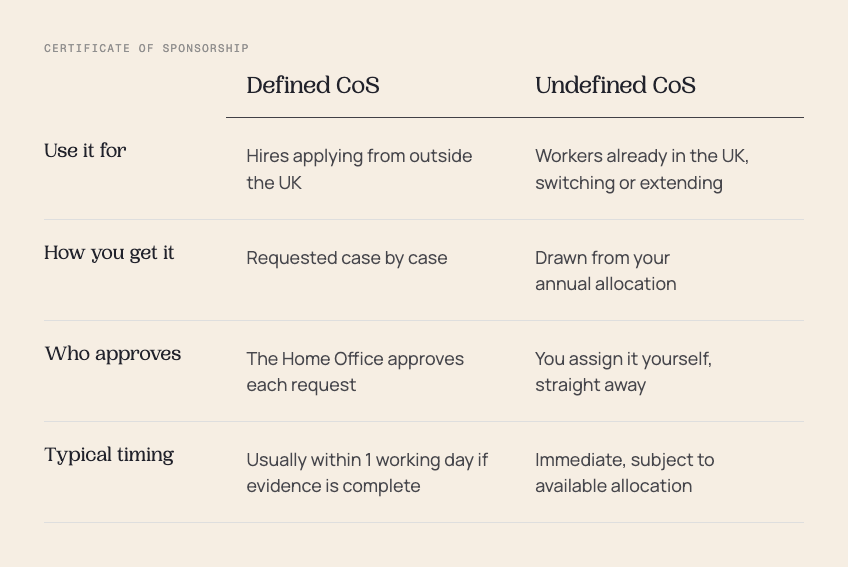
A defined CoS is for someone applying for a Skilled Worker visa from overseas. You request it individually, and the Home Office decides each one. With complete evidence, that decision usually comes back the next working day, though it isn’t guaranteed: if the request is paused for checks on the role’s genuineness or the salary, it can run to 10 to 15 working days, and in rare cases longer.
An undefined CoS is for a worker who is already in the UK and switching into sponsorship or extending their stay. You don’t ask permission each time. You’re given an annual allocation and you assign from it as you need to.
The trap is simple and costly: issue an undefined CoS to someone applying from abroad, or a defined CoS to someone already in the UK, and the Home Office refuses the visa automatically. No appeal, no quick fix, you start again. For the full breakdown of when each applies, see our guide to defined vs undefined Certificates of Sponsorship.
How your annual allocation is assessed
Your undefined CoS allocation is the pool you draw from for in-country hires, switches and renewals. The Home Office sizes it based on your workforce and the nature of your business, so a growing employer and a stable one won’t get the same number.
Three things are worth knowing:
- If your allocation runs low, you request an increase through the SMS, with evidence of why you need more.
- Any CoS you don’t use are removed at the end of your allocation year. They don’t roll over.
- Your allocation is renewed each year while your licence is valid.
The practical takeaway: plan your allocation around your renewals and expected in-country switches, not just your new hires. Employers who only budget for new starters are the ones who run dry mid-year.
Switching and renewals run on undefined CoS
This is where a lot of sponsors get caught, because renewals feel like a continuation rather than a fresh request. They aren’t.
Every extension needs a new CoS. When a worker already in the UK switches into the Skilled Worker route, or when an existing sponsored worker’s visa comes up for renewal, you assign a new undefined CoS from your allocation. And the salary has to meet the rules in force at the time of the renewal, not the rate you set when you first hired them. If thresholds have risen since, a worker who was comfortably above the line can fall below it on renewal, which is one of the more common ways an extension goes wrong.
What the Home Office expects in every request
Most requests don’t fail because the evidence doesn’t exist. They fail because it’s incomplete or inconsistent across the application. The Home Office is looking for three kinds of evidence:
- Role evidence. The job details and a signed employment contract that match what’s on the CoS.
- Operational evidence. Your staffing data and team capacity, plus proof of genuine business need: new contracts, growth, or operational changes.
- Candidate evidence. The worker’s details, their financial position where relevant, and their visa status.
Different situations call for extra evidence on top:
- Replacing a leaver: evidence of the resignation or dismissal, ideally with a P45.
- Growing the team: new contracts, increased service hours, organisational changes.
- Visa extensions: full individual details (name, CoS number, date of birth, expiry, role), and prioritise the visas expiring soonest.
- Acquisitions or transfers: ask the seller to assign CoS before completion for any workers who’ll need renewing in the coming months.
Why CoS requests get refused
Two failures account for most refusals. If you only pressure-test two things before you submit, make it these.
The role doesn’t meet genuine vacancy rules. This is the single biggest reason requests fail. It goes wrong when the job description doesn’t match the CoS, when the responsibilities are vague or inconsistent, or when there isn’t enough evidence of business need. The result is refusal, and more scrutiny on your next application.
The salary doesn’t meet the requirement. The pay has to clear the threshold for the specific occupation code. It goes wrong when the salary is below threshold, when working hours are calculated incorrectly so the effective rate drops, or when the role is mapped to the wrong occupation code. The result is rejection and a delayed hire.
Your pre-submission checklist
Run these five checks before every CoS request and you’ve dealt with the failures above before they happen:
- Validate the role against genuine vacancy rules.
- Confirm the salary meets the occupation code threshold.
- Check every CoS field is complete and consistent with your supporting documents.
- Prepare your supporting documentation up front, before the Home Office asks for it.
- Standardise your submission process so it’s the same every time, whoever runs it.
If you’re getting your sponsorship set-up right in the first place, our Sponsor Licence Application Guide and document checklist covers what you need in place before CoS even comes into play.
How Borderless helps
Borderless Immigration is the end-to-end platform for UK work visas. We run sponsor licence applications, CoS requests and ongoing Home Office compliance for more than 600 UK employers, with over 4,500 visas granted.
For CoS specifically, the platform validates every request before it’s submitted, so genuine-vacancy and salary issues get caught early. It standardises applications so they process faster, keeps your documentation complete and in one place, and tracks your allocation and deadlines so you’re never caught by the five-day window or left short of CoS mid-year. One structured workflow, every request, every check in date.
If you’re already requesting CoS and want it to run more smoothly, book a call with our team and we’ll show you where the risk sits in your current process.
This article is for general information and reflects the rules and Home Office guidance as at June 2026. Immigration rules change frequently, and nothing here is legal advice. For advice on your own circumstances, speak to a qualified adviser.
Automate Home Office Audits with Borderless
The Borderless platform provides a centralized system for all sponsorships, automating reminders for key tasks and ensuring best practices across your organization, simplifying audit preparation and ongoing compliance.